Guide
How to do competitor analysis with Claude
The exact prompt, the method around it, and a 10-point checklist to run before you trust the output.
Last updated: July 28, 2026
Claude is genuinely good at competitor analysis. Give it a fixed structure, make it cite a source for every claim, and it will turn a competitor's website, their reviews, and your own notes into a solid first-pass report. This guide has the exact prompt, the method around it, and a checklist for grading what comes back. Plan on three to five competitors; that is a normal scope.
One thing before we start: we build Competely, a competitor analysis tool, so this exact job is what we work on all day. Everything below runs entirely in Claude. At the end we will tell you where a dedicated tool does the job better, and where it honestly does not matter.
The prompt
This works on any Claude plan. For the best results, turn on Research first: click the + button next to where you type your message, then choose Research. It is a paid-plan feature. Without it, Claude's ordinary web search still reads live pages, so the prompt still works. Research just digs deeper, which suits an eight-section analysis.
You are my competitive analyst. Research the competitor below on the live web. If I have attached files (notes, screenshots, exports), read them too, and prefer the live web wherever they disagree.

Competitor: [name and website URL]
My product, for context: [one line on what you do]

Write the analysis under these eight headings, worded exactly as shown, so I can line this competitor up against others later:

1. Marketing & Messaging: how they present themselves. Quote the homepage headline and main value claims word for word, not paraphrased.
2. Product & Features: what the product does. Separate what is live today from what is only announced or on a roadmap.
3. Pricing & Sales: every public plan, quoted exactly as the pricing page states it: currency, price, billing period (monthly and annual), seat minimums, usage limits, and conditions like "starts at" or "annual only". Note how they sell: self-serve, sales-led, or both.
4. Audience & Customers: who they target and who actually uses them, based on their case studies, review-site presence, and their own copy.
5. Customer Sentiment: what users praise and what they complain about, from review sites (G2, Capterra, Trustpilot) and forums like Reddit. Include two or three short quotes with links.
6. Company Profile: founding year, headquarters, team size, and funding. Only include numbers you can source, and date each one.
7. Market & Opportunity: the category, the main alternatives, and recent moves (launches, price changes, repositioning), each with a date.
8. SWOT Analysis: strengths, weaknesses, opportunities, and threats, each tied to evidence from the sections above.

Rules:
- Put the source URL in the same sentence as the claim it supports, not in a list at the end.
- If you cannot find support for a fact, write "no public source found" and move on. Do not fill the gap with a plausible guess.
- Do not invent numbers, customer names, features, or quotes.
- End with today's date as the research date, plus a short list of the claims most likely to go stale first (prices, plans, anything recent).
What Claude gets right, and where it hits a ceiling
Claude's biggest strength in competitor research is reading. Give it a competitor's pricing page, a stack of reviews, and your own notes, and it pulls one coherent picture out of the pile. Research mode adds the legwork: instead of you pasting pages in one at a time, Claude plans a chain of searches and works through what it finds on its own.
The ceilings are just as specific. Pricing is the first thing to verify. Not because Claude is careless, but because pricing pages change without notice: a figure can be right in one source and already outdated on the page that matters. Treat every price as unchecked until you have the competitor's live pricing page open in another tab.
Structure drifts too. Run the same prompt on several competitors and the outputs will not match: one comes back in tables, another in bullets. Pin the headings down the way the prompt above does, and most of that drift stops.
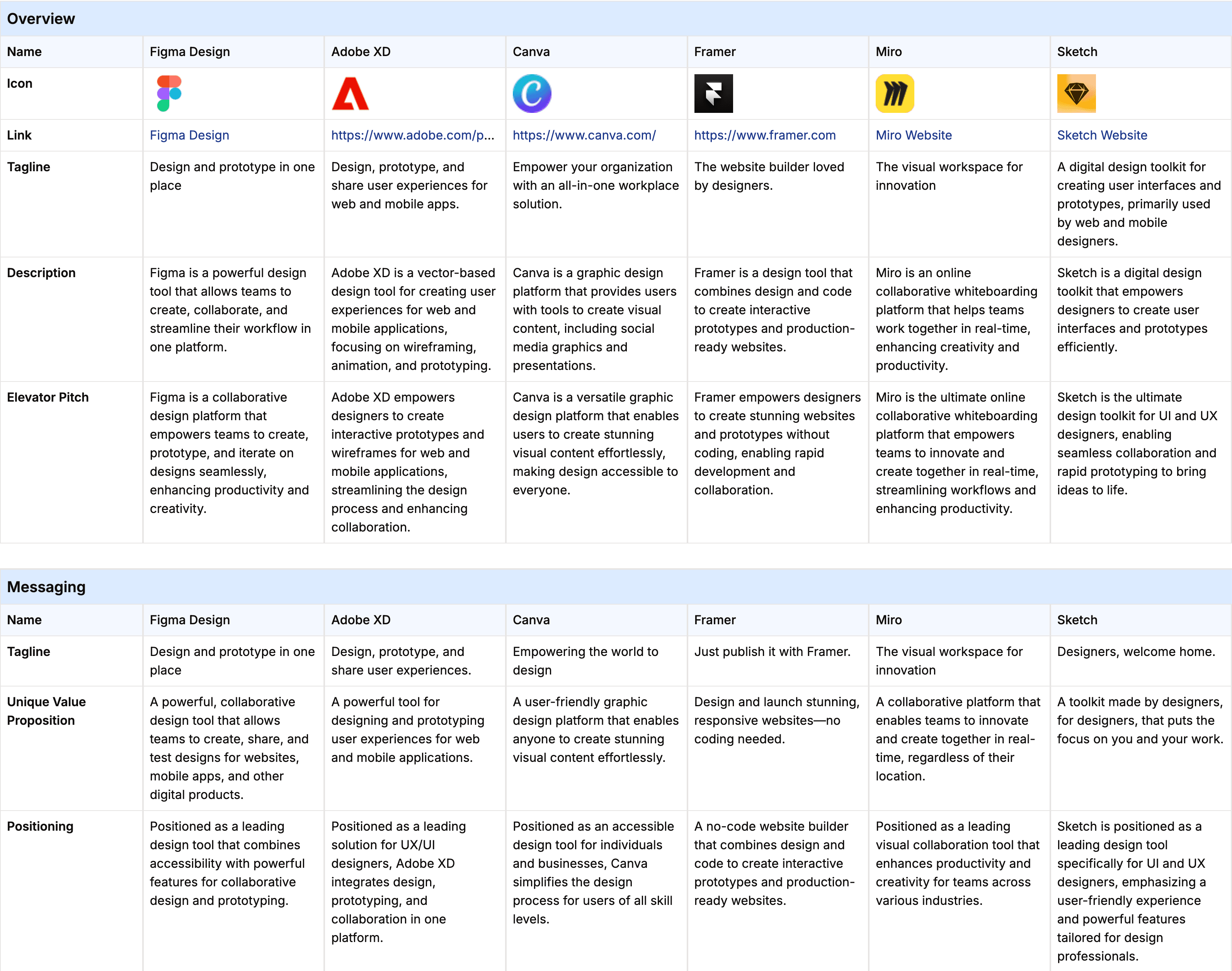
So that you know what you are aiming for, here is a finished analysis built on the same eight headings. This one compares Figma and Adobe XD, and it comes from our own tool, so treat it as the fully-built version of the structure rather than what a single Claude run will produce. The shape is the target: every section filled in, every data point with a source next to it.
The method, step by step
1. Ask inside a fixed structure
"Tell me about Competitor X" gets you a wandering essay. The prompt above works because it hands Claude eight labeled dimensions and insists on the headings word for word. Same structure in, comparable output out. And because those eight headings match the sample analysis you just saw, you can hold your own output next to it and see exactly where yours is thinner.
2. Put your product context in a Claude Project
A Project gives every chat inside it a shared knowledge base and standing instructions. Load your product details once: positioning, target customer, current pricing. Add the analysis rules as project instructions. Then you stop re-pasting the same three paragraphs into every chat.
Two boundaries to know. Each chat inside a Project is still its own conversation; what they share is the knowledge base, not each other's history. So give each competitor its own chat and their details will not blur together.
Uploads have limits too: roughly 20 files per chat, with size caps. And once a knowledge base gets large, Claude pulls the parts it judges relevant rather than reading all of it every time. Curate what you add instead of dumping everything in.
3. Require a source per claim, then verify what you will act on
Claude's built-in citations do not attach to every sentence, and they do not survive a copy-paste into your own document. Writing the URL into the sentence, the way the prompt demands, fixes both. Then verify the claims you will actually act on, starting with pricing: open the competitor's pricing page and compare line by line. Seat minimums, annual-only discounts, and quietly retired tiers are the usual things to miss. Anything described as recent (a launch, a funding round, a rebrand) gets the same treatment: open the source, check the date.
4. Run every competitor through the identical structure
Comparison is the whole point, and comparison dies when each competitor comes back shaped differently. Same prompt, same headings, one competitor per chat. Some drift still creeps in between runs: formatting, section depth, tables versus bullets.
The easiest fix is a Claude Skill, a set of instructions you write once and Claude reuses on request. A competitor-analysis Skill holds the eight headings and the sourcing rules, so every run starts from the same version instead of a pasted prompt that quietly drifts over time. The Project holds who you are; the Skill holds how the analysis runs.
When the output comes back: 10 checks before you trust it
Claude will return something that looks finished and authoritative. Whether it actually is comes down to these checks. Every one of them grades something the prompt explicitly asked for.
- Prices match the competitor's live pricing page, plan by plan: price, billing period, seat minimums (the smallest number of licenses a plan makes you buy), usage limits. The live page wins every disagreement.
- Every factual claim carries a source URL in its own sentence, and you have opened the sources behind anything you plan to act on.
- Every "no public source found" line is resolved: you found the fact elsewhere, or you accepted it as unknown. None quietly filled in.
- Messaging quotes match the competitor's site word for word. A paraphrase hides the exact positioning you are trying to study.
- Features are split into live today versus announced. A roadmap promise is not a feature.
- Recent moves (launches, price changes, repositioning) each carry a date you can check.
- Company numbers (funding, team size, customers) each carry a dated source. A round number with no source is a guess.
- Sentiment quotes link to reviews you can open, not to summaries of reviews.
- Every competitor came back under the identical eight headings, so the analyses line up side by side.
- The research date is on the document, so you can tell at a glance how old the analysis is.
Start with pricing and the recent stuff. Those change fastest, and they are usually what you act on.
Keeping the analysis current
Everything above produces a snapshot, and competitors keep moving after you file it. The worst way to learn about a rival's price change is from a customer, so decide now how you will hear about the next one. You have three honest options.
Do it by hand. A recurring calendar reminder to re-run the same prompt and compare the new answer with the old one. Cheap, and it works as long as you actually do it.
Build it in Claude. Most guides will tell you Claude cannot monitor competitors. That is out of date. Claude Cowork, Anthropic's tool for running work on a schedule, can re-run your research daily, weekly, or even hourly in the cloud, with your laptop closed. What it does not hand you is a finished monitoring product: you choose the pages to check, define what counts as a real change, and hold every run to one output format, and the results collect in Cowork's Scheduled view unless you build a delivery step yourself. It is a capable kit for building a monitor. It is not a monitor.
Buy it. A monitoring product does the re-checking on a schedule and sends you what changed. You trade flexibility for zero maintenance. That option is where our own product comes in, which brings us to the part we promised at the top.
Where Competely fits, and where it does not
Competely automates the method above. You enter your product and your competitors, and it analyzes each one across the same eight dimensions the prompt uses, more than 100 data points in total, each with its own source link. An analysis takes 30 minutes, and because the structure never varies, the analyses line up side by side without cleanup. The checklist you just read is, roughly, the work it does for you.
Its monitoring runs on a schedule, not in real time. On the cadence you pick per project (weekly, every two weeks, or monthly, depending on plan), it re-reads each competitor's public pages, flags what changed, and emails you a short brief. It only watches their public pages: a launch announced on LinkedIn or in the press will not reach your brief until it reaches their website, and there is no social listening or press tracking. If Claude plus your own discipline covers you, you do not need it. What it sells is never having to do the re-checking yourself.
Self-serve, from $39/mo, no demo call.
Frequently asked questions
- Can Claude do competitor analysis?
- Yes. Claude produces a strong first-pass competitor analysis, especially when you give it a fixed structure and attach your own material (notes, exports, screenshots) for it to read alongside the live web. Use the eight-heading prompt above, require a source URL beside each claim, and keep one competitor per chat. Then verify pricing and anything recent against the competitor's own pages before acting on it.
- How accurate is Claude for competitor research?
- Accurate enough to draft from. Not accurate enough to act on before you verify it. The risk concentrates in facts that change fast: prices, plan limits, anything from the last few months. A source can be correct on one page and already outdated on the page that matters. Sourcing each claim individually makes the weak spots visible, because every claim either carries a URL you can open or says plainly that no public source was found. Verify what you plan to act on.
- Can Claude monitor competitors automatically?
- Yes. Claude Cowork, its tool for running work on a schedule, can re-run a prompt daily, weekly, or even hourly in the cloud with your laptop closed. Anthropic's own docs describe recurring research as one of its uses. You take on the setup and the upkeep: choosing the sources and how often it runs, defining what counts as a change, and keeping the output comparable run to run. Unless you build a delivery step, you also collect the results yourself from the Scheduled view. There is no competitor-specific change log built in, so a monitoring tool is the alternative if you would rather not maintain one.
- Do I need a paid Claude plan for this?
- For Research, yes: it is a paid-plan feature, enabled with + then Research in the message box. Without it, Claude's ordinary web search still reads live pages, so the prompt still works. Research adds a deeper multi-step investigation, which fits an eight-section analysis better.
- What is the difference between Claude Research and ordinary web search here?
- Depth. Ordinary search makes a handful of lookups to answer the question in front of it. Research plans a longer investigation: it runs a chain of searches, follows leads across sources, and compiles the result. That is the right depth for filling eight dimensions on one competitor in a single pass. For checking one fact, ordinary search is fine.
- Should I use a Claude Skill or a Project for repeatable competitor analysis?
- Both, for different halves of the job. A Project holds context: your product details and standing instructions, shared by every chat inside it. A Skill holds procedure: the eight headings and sourcing rules as a reusable instruction set Claude applies on request. If you run this occasionally, pasting the prompt into a Project chat is enough; the Skill earns its keep once the analysis becomes routine.
- Is Claude or ChatGPT better for competitor research?
- For one competitor in one sitting, both are good and the difference rarely decides anything. Claude has the edge when you feed it long documents of your own. Both can schedule recurring runs: Cowork scheduled tasks in Claude, Scheduled Tasks in ChatGPT. Neither one cites a source on every claim unless you force it, and neither keeps its output identically structured across runs. That is why the fixed prompt matters more than which model you pick.
- How do I keep a Claude competitor analysis up to date?
- Re-run it, by hand or on a schedule. By hand: save the exact prompt, set a recurring reminder, and compare each new output against the previous one to see what moved. In Claude: a Cowork scheduled task re-runs the research on a cadence you set, with the setup work described above. If you would rather not maintain either, Competely's monitoring re-reads each competitor's public pages weekly, every two weeks, or monthly and emails a brief of the differences.
- Can I see what a dedicated competitor analysis tool produces without signing up?
- Yes. Competely keeps full sample analyses open to anyone, no account needed. Figma vs Adobe XD is a good starting point: the same eight dimensions as the prompt above, more than 100 data points, a source link on each. Read it next to your own Claude output and decide whether the do-it-yourself version covers what you need.
Related
Capabilities and limits of the third-party tools described here are based on publicly available information and change frequently; check each tool's own site for current details. Product names, logos, and trademarks are the property of their respective owners. Competely is independent and is not affiliated with, endorsed by, or sponsored by any other company mentioned.